

Keeping Claude Code in Sync with Your Supabase Schema
Every time I asked Claude Code to add a column, it wrote a new migration file. A few weeks into Claripulse, supabase/migrations/ had a couple dozen of them, and answering a question as basic as "what columns does the signals table have right now?" meant replaying the whole sequence in my head. That is also what I was making the agent do on every request that touched the database, and it got it wrong often enough to matter.
A folder of migrations records how the schema got here. It never tells you where "here" is. That's tolerable when a human is the only reader, because you can always open the Supabase dashboard and look. It's a real problem when your primary reader is a coding agent whose entire view of the world is the repo.
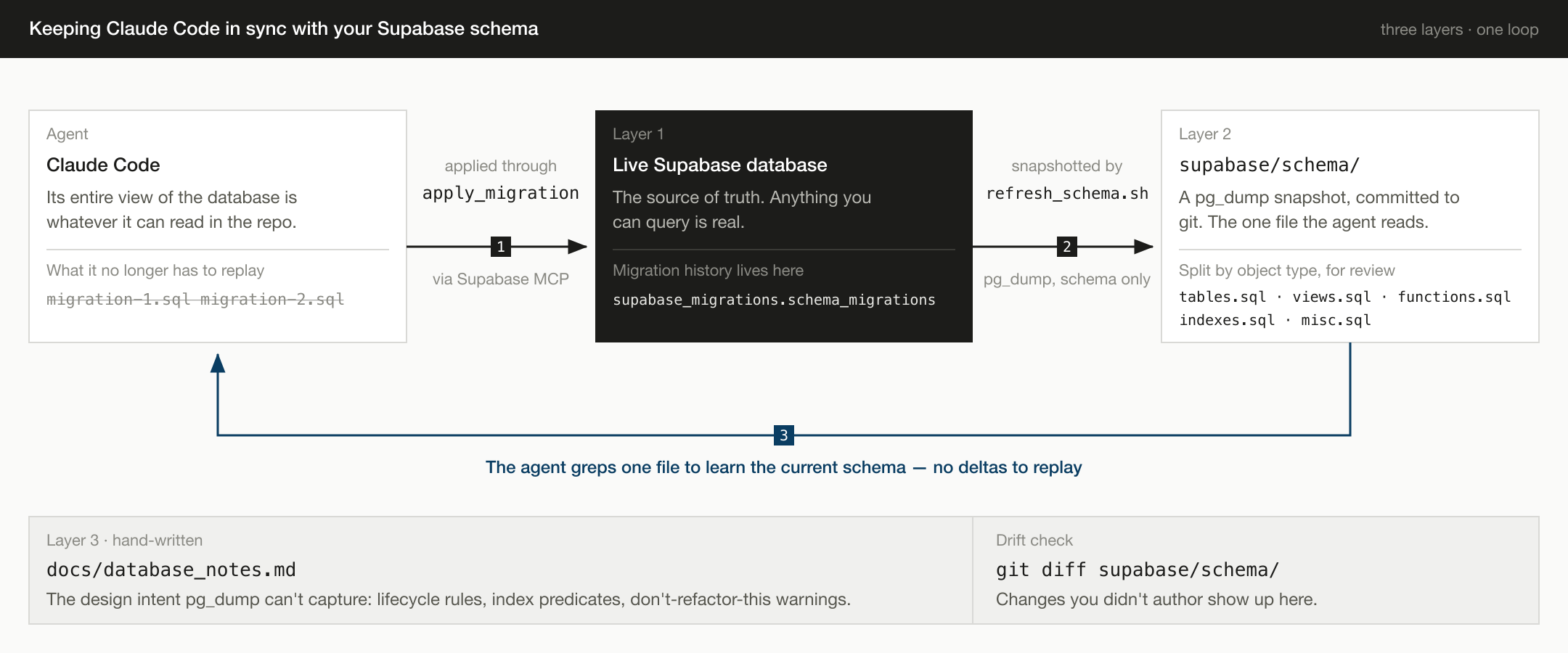
So I stopped keeping migrations as files. The live database is the source of truth, a pg_dump snapshot in supabase/schema/ is the copy the agent reads, migrations are applied through the Supabase MCP server and recorded in the database itself, and a single docs/database_notes.md captures the design intent that pg_dump cannot.
Here's exactly how it's set up.
The Core Idea
There are three layers, and each one has exactly one job:
- The live Supabase database is the source of truth. Anything you can query is real. Anything in a file but not in the database is fiction.
supabase/schema/is an auto-generated snapshot of the live database, committed to git. It exists so that code review,git blame, and historical diffs work for schema changes the same way they work for application code.docs/database_notes.mdis a hand-written file that captures the why behind non-obvious schema choices. Lifecycle states for an enum, the reasoning behind a partial-index predicate, the constraint that prevents a foot-gun. Thingspg_dumpflattens or omits.
There is no folder of hand-written migration files that you maintain. Migrations are created and applied through the MCP server, which records them in supabase_migrations.schema_migrations automatically.
Why a Migration Folder Fails an AI Agent
The classic Supabase setup has you write supabase/migrations/NNN_description.sql files and apply them via the Supabase CLI. This works fine on day one. The problems show up later:
- Current state is never written down. The schema exists only as the sum of every migration ever applied. To know whether a column exists, an agent has to read all of them in order and simulate the result. Twenty files in, that costs a lot of context to get an answer that a single file could have given for free, and the agent will occasionally get it wrong — writing code against a column that a later migration renamed.
- Drift. Someone clicks something in the dashboard, or runs a one-off
ALTER TABLEin apsqlshell, and now the migration folder no longer describes the actual database. Once that happens, every future migration is built on a fiction, and so is everything the agent infers from the folder. - Re-running history is fragile. Long migration histories accumulate
DROP COLUMNandRENAMEand partial reversions. Replaying them from scratch on a new environment becomes its own debugging exercise. - The folder doesn't help reviewers. A PR that says "added a partial index" gives you the
CREATE INDEXbut not the surrounding tables, indexes, and functions it interacts with. Reviewers can't see the shape of the schema, only the delta.
What I wanted was a single file (or a small set of split files) where the agent — or I — could open one tab, hit Cmd-F, and immediately see the current state of the database. That is what pg_dump --schema-only produces, and that is what gets committed.
The refresh_schema.sh Script
The whole snapshot pipeline is one shell script and one small Python helper:
#!/usr/bin/env bash
# scripts/refresh_schema.sh
set -euo pipefail
cd "$(dirname "$0")/.."

if [ -z "${DATABASE_URL:-}" ] && [ -f .env ]; then
  set +e; set -a
  . ./.env 2>/dev/null
  set +a; set -e
fi

if [ -z "${DATABASE_URL:-}" ]; then
  echo "ERROR: DATABASE_URL not set." >&2
  exit 1
fi

mkdir -p supabase/schema

pg_dump "$DATABASE_URL" \
  --schema-only --no-owner --no-acl --schema=public \
  | sed -E '/^\\(restrict|unrestrict) /d' \
  > supabase/schema/schema_dump.sql

uv run python scripts/split_schema_dump.py supabase/schema/schema_dump.sql

echo "Done. Review with: git diff supabase/schema/"
A few things worth calling out:
--schema-only --no-owner --no-acl --schema=publicstrips the parts ofpg_dumpoutput that are noisy and environment-specific. No data, no role grants, no ownership lines. Just the structure.- The
sedfilter removes\restrictand\unrestricttokens that newerpg_dumpversions emit with random nonces inside them. Without this, every snapshot diff is full of meaningless changes and you eventually stop reading them. (If you stop reading the diffs, the snapshot has no value.) scripts/split_schema_dump.pytakes the monolithic dump and splits it intotables.sql,views.sql,functions.sql,indexes.sql, andmisc.sql. The full dump still gets committed too. The split files are for navigation, the full dump is the canonical artifact.
Splitting matters more than I expected. Once schema_dump.sql crosses a few thousand lines, GitHub PR diffs become unwieldy. Splitting by object type means a function change shows up in functions.sql and a column change shows up in tables.sql, and reviewers can scan the relevant file in isolation.
The Splitter
The Python helper is short and dumb on purpose. pg_dump writes a header before each object that looks like:
-- Name: my_function(int); Type: FUNCTION; Schema: public; Owner: -
The splitter scans for those headers, reads the Type:, and routes each section to the right file based on a small dict:
BUCKETS = {
    "TABLE": "tables.sql",
    "SEQUENCE": "tables.sql",
    "CONSTRAINT": "tables.sql",
    "FK CONSTRAINT": "tables.sql",
    "VIEW": "views.sql",
    "MATERIALIZED VIEW": "views.sql",
    "FUNCTION": "functions.sql",
    "PROCEDURE": "functions.sql",
    "TRIGGER": "functions.sql",
    "INDEX": "indexes.sql",
    # ... and a few more
}
Anything the splitter doesn't recognize falls through to misc.sql so nothing is silently dropped. Each output file gets an "AUTO-GENERATED, do not edit by hand" header. Because this is a derived artifact, regenerating it is always cheap and there's never a reason to hand-edit one of these files.
Applying Schema Changes via MCP
This is where the workflow diverges from the standard Supabase CLI flow. Instead of writing a migration file and running supabase db push, I apply migrations through the Supabase MCP server directly from Claude Code:
mcp__supabase__apply_migration(
  name="add_signals_quadrant_column",
  query="ALTER TABLE signals ADD COLUMN quadrant TEXT CHECK (quadrant IN ('priority', 'investigate', 'watch'));"
)
Two things happen when this runs:
- The DDL is applied to the live database.
- The migration is recorded in
supabase_migrations.schema_migrationswith the name and SQL, the same table the Supabase CLI would write to.
The migration history is still there, intact, queryable, and recoverable. It just lives in the database rather than in a folder of files. (You can see it via mcp__supabase__list_migrations or by querying supabase_migrations.schema_migrations directly.)
After applying the migration I run:
./scripts/refresh_schema.sh
git diff supabase/schema/
The diff should show exactly the change I just made. If it shows more than that, the live database has drifted (someone ran something out of band) and I need to figure out what before continuing.
That last point is the one that makes the whole workflow worth it. The snapshot is a drift detector. If git diff supabase/schema/ ever shows changes I didn't author, somebody (or some other process) is editing the database without going through migrations, and I want to know about it before it compounds.
The Migration Folder
I keep supabase/migrations/ mostly empty, with a single file: 001_baseline.sql. It's an idempotent consolidated snapshot of the schema, useful as a "what does this database actually look like, top to bottom" reference, and as a starting point if I ever need to bootstrap a fresh environment. It is NOT the source of truth and I don't update it on every migration. I refresh it occasionally when the schema has shifted enough that the baseline feels stale.
The reason I don't save migration SQL into this folder is that the live database already has it (in supabase_migrations.schema_migrations) and the snapshot already shows the resulting structure. A third copy in a numbered file is redundant, and historically, redundant copies are the things that drift.
database_notes.md: The Things pg_dump Can't Capture
pg_dump gives you a perfect mechanical record of what exists. It says nothing about why. There are several categories of design intent that simply do not survive a schema dump:
- Lifecycle semantics for enum-like columns. A
CHECK (status IN ('active', 'confirmed', 'resolved', 'dismissed'))constraint shows you the allowed values, but not what each value means or which transitions are legal. - The reasoning behind a partial index predicate.
WHERE narrative_embedding IS NULL AND (event_description IS NOT NULL OR additional_narrative IS NOT NULL)is doing a specific job for a specific worker. Future-me will not remember this in six months. - "Don't refactor this back" notes. I have one CTE in a materialized view that looks like it could be simplified into a single join, but the simplification inflates
SUM(report_count)because of fan-out. The note exists so that future-me does not "clean up" the code and silently break the totals. - Why two RPCs are deliberate parallels. Some of my functions have group-level twins (
device_group_signal_overviewmirrorsdevice_signal_overview). Their input/output shapes need to stay aligned, but a fresh reader has no way of knowing that from the function bodies alone.
So I keep docs/database_notes.md as a hand-written companion to the auto-generated snapshot. It's small (under 100 lines) and stays small because it only contains things that genuinely cannot be inferred from the SQL itself. If I find myself writing a note that just describes what the SQL already shows, I delete it.
The Full Workflow
The whole loop, end to end, is just three steps:
- Read state. Open
supabase/schema/schema_dump.sqlor grep one of the split files to confirm what currently exists. - Apply the change. Use
mcp__supabase__apply_migration(orpsql "$DATABASE_URL" -ffor a manual run) with idempotent DDL:CREATE ... IF NOT EXISTS,ALTER TABLE ... ADD COLUMN IF NOT EXISTS,CREATE OR REPLACE FUNCTION. NoDROP TABLEorDROP COLUMNwithout explicit thought. - Refresh the snapshot. Run
./scripts/refresh_schema.sh, review the diff, and commitsupabase/schema/alongside any application code that depends on the schema change. If the change has a non-obvious motivation, add a paragraph todocs/database_notes.md.
That's it. There is no fourth step where you also write a numbered migration file by hand and try to keep it in sync.
What This Buys You
A few concrete things I get from this setup that I didn't have before:
- One place to read the schema. When Claude Code needs to know whether a column exists, it greps
tables.sql. One file read, one correct answer, no reconstructing current state from a dozen deltas. This is the whole reason I built the thing. - Reviewable schema PRs. A PR that touches a function, an index, and a constraint shows three small diffs in three different files instead of one giant blob.
- Drift detection for free.
git diff supabase/schema/after arefresh_schema.shrun is a one-line check for "did anything change in the database that I didn't intend?" - No re-application order to debug. Because nobody is replaying a folder of migrations from scratch, there is no order-of-application bug class.
- Notes that don't rot. Because
database_notes.mdis hand-written and small, the entropy is low and it stays accurate. The big auto-generated files don't need notes because they're the ground truth.
Caveats and When This Doesn't Fit
This workflow assumes a single source database (or a very small number of them) where you treat the live schema as authoritative. It works very well for:
- Solo or small-team projects.
- Projects where the database is hosted on Supabase and you have direct access via MCP or
psql. - Projects where you trust everyone touching the database to apply changes through the documented path.
It fits less well for:
- Multi-environment setups where you genuinely need to replay the same migration sequence against staging, production, and CI clones from scratch. In that case the standard
supabase/migrations/folder with sequential SQL files is still the right answer, even with the drift risk. - Teams large enough that someone will run an ad-hoc
ALTER TABLEagainst production. The drift detector helps you catch it, but it doesn't prevent it.
For a one-database project where I want a fast, low-ceremony loop, the snapshot-plus-MCP approach has been the cleanest setup I've used.
Files to Steal
If you want to drop this into your own Supabase project, the two files you need are:
scripts/refresh_schema.sh(the bash script above)scripts/split_schema_dump.py(a ~50-line Python script that does header-based section splitting)
Then add supabase/schema/ and docs/database_notes.md to the repo, and write a short Database Rules section in your CLAUDE.md (or README.md) describing the three-step workflow above so that future-you (and your AI assistants) follow the same path.
The whole thing is maybe 100 lines of glue code, and it has done more for my schema sanity than any migration tool I've used.